.png)
When you work on dental SEO, there are plenty of technical details that can easily get pushed down the list. Schema is often one of them. You add the practice name, address, phone number, services, and other details to your website, then assume Google can figure out the rest.
But there is an important question many dental practices never stop to ask: Are you using the right schema type for your practice?
LocalBusiness is a broad schema type that can describe almost any local business. Dentist, on the other hand, is specifically designed to describe a dental practice. That difference may seem small, but it matters when you want to give search engines clearer information about what your business actually is.
The mistake is treating schema as a box you simply need to check. Choosing a relevant schema type, adding accurate information, and keeping it consistent with the visible content on your website all matter.
So before you copy a generic LocalBusiness schema from another website, take a closer look. In this guide, we’ll explain the difference between the LocalBusiness and Dentist schemas when each makes sense, what information you should include, and how to set it up properly without making your website more complicated than it needs to be.
Think of schema markup as a translator for your website. Search engines can read your content, but schema helps them understand what that information actually means. Instead of guessing which number is your phone, which address is your office, or which services you provide, schema spells it out clearly.
For dental practices, that clarity matters in local search. Your location, services, hours, and contact details all help search engines understand whether your practice matches what a nearby patient is looking for. Schema gives those details a clear structure.
For a broader explanation of how structured data supports websites, see this guide to why schema markup is important.
And there is another reason this matters today. Patients are no longer relying only on traditional Google searches. They are also asking tools like ChatGPT, Gemini, and Perplexity for local recommendations and answers. These systems use information from different sources, so keeping your practice details accurate and consistent is increasingly important.
This is where the LocalBusiness and Dentist schemas come into the picture. LocalBusiness tells search engines you are a local business. Dentists go one step further by identifying what kind of business you actually are.
Schema is not a magic ranking button. Its job is much simpler: give search engines a clearer picture of your dental practice.
Schema.org sounds more complicated than it really is. At its core, it works a lot like a family tree. You start with a broad category, then move into more specific types.
For example:
Thing → Organization → LocalBusiness → MedicalBusiness → Dentist
There are other branches, too. A hospital, physician practice, urgent care center, or pharmacy can each have a more specific type that describes the business more accurately.
For a dental practice, Dentist is the type that gets specific about what you actually do. It sits within the broader LocalBusiness structure while giving search engines more context about your practice as a dental business.
That means you can still describe the details that matter locally, such as your address, phone number, hours, location, and other business information.
You may come across schema examples using multiple types together. In most cases, though, you do not need to overthink it. If a dentist accurately describes your practice, it is the clearest place to start.
For a dental practice, Dentist gives search engines a much clearer idea of what your business actually is than a generic LocalBusiness label.
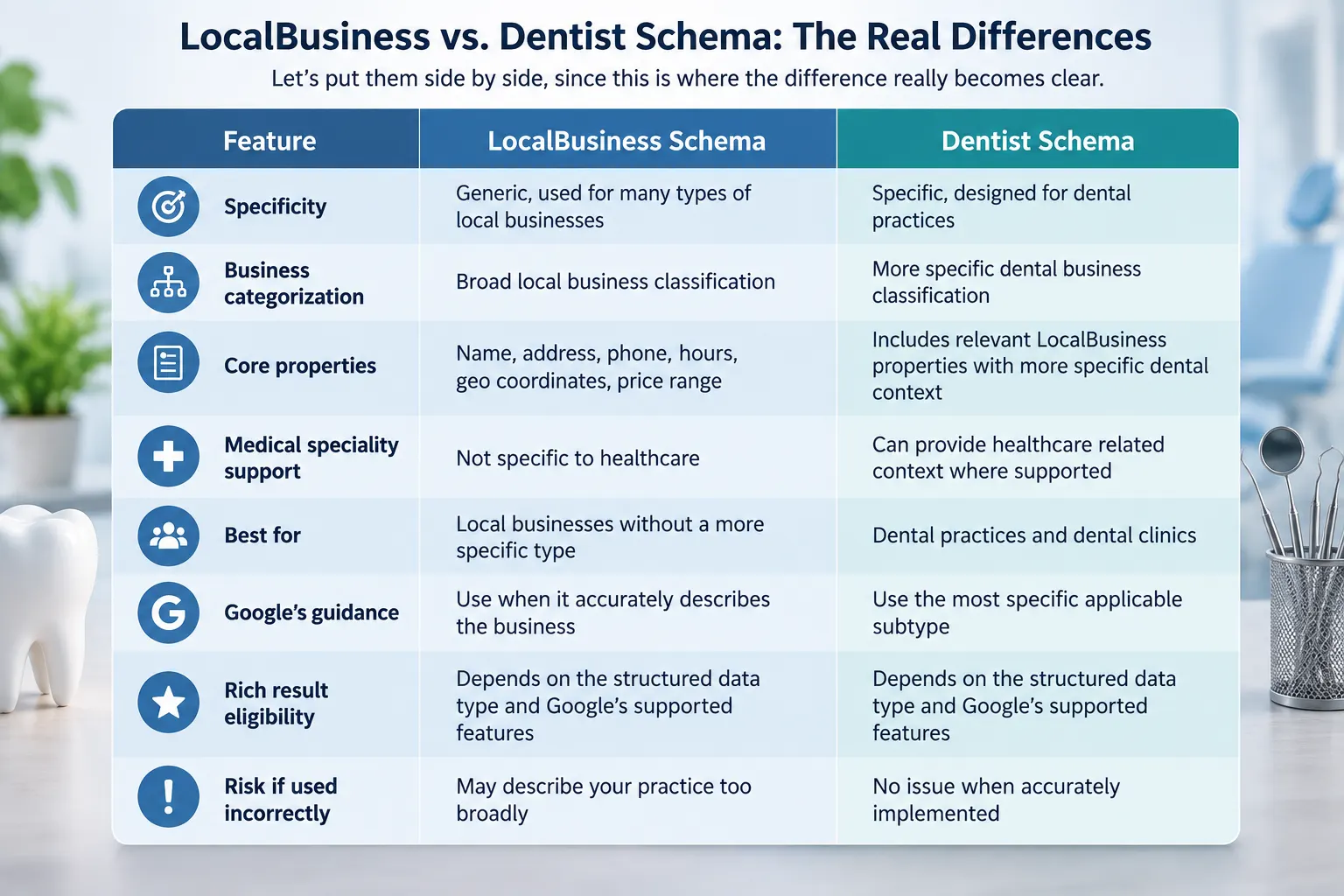
The honest, unglamorous truth is that this isn't really an "either/or" fight. It's a "which one is the parent and which is the child" situation. The dentist schema inherits everything LocalBusiness offers and adds dental-specific meaning on top of it.
So when someone asks, “Should I use LocalBusiness or Dentist?" the better answer is usually Dentist when it accurately describes your practice. You are not giving up the useful local business information. You are simply describing your business more specifically.
Google's guidance here is pretty straightforward: use the most specific schema type that accurately describes your business. It gives search engines a clearer understanding of what your business actually is.
For a dental practice, LocalBusiness is accurate but broad. Dentists are more precise. It tells search engines that the local business is specifically a dental practice, rather than leaving them to work that out from the rest of your website.
That distinction matters even more when patients make specific local searches, such as “orthodontist near me” or “emergency dentist in Austin.” Schema does not guarantee rankings or Local Pack placement, but accurate business information helps search engines understand your practice and its relevance.
So, if you run a dental practice, a dentist is generally the better primary type. You can still include the relevant local business properties that describe your address, phone number, hours, location, and other practice details.
For additional guidance on building a stronger local search presence, explore these local SEO strategies for dental practices.
Dentist is the most specific Schema.org type for a dental practice. It tells search engines exactly what your business is, along with key details such as your name, address, phone number, website, hours, and location.
Key details to include:
You do not need to fill in every available field. Start with the details that genuinely describe your dental office and match what your patients can see on your website.
As a dentist, you already sit within the broader local business hierarchy, so you can still use relevant local business properties. After all, these details help describe where your practice operates and how patients can find you.
Useful local properties must include:
The important part is consistency. Your schema should match the address, phone number, hours, and other details patients see on your website and business profiles.
A dental practice is more than a local business. It is a healthcare business with a specific area of practice. Where appropriate, structured data can provide additional context about your organization, providers, and services.
Do not add medical properties simply to make your schema look more complete. Every property should describe something that is genuinely true about your practice.
Patients often search for a treatment rather than the practice itself. Someone may look for “dental implants near me,” “Invisalign dentist,” or “emergency dental care.”
Make those services clear on the relevant pages of your website. Where supported and appropriate, use structured data that accurately describes the service and its page content.
Your patients probably ask the same questions every week. How much does treatment cost? Do you accept insurance? How long does an implant take? What should I do before an appointment?
Put those answers on your website where they are useful. FAQ-structured data can help search engines understand that content, but it should only be used when the page meets Google's current requirements.
Dental websites can have a lot of pages. Treatments, specialties, locations, providers, and educational content can quickly make the site structure complicated.
BreadcrumbList helps show those relationships clearly, such as
Home → Treatments → Dental Implants
It is a small addition, but it gives search engines more context about how your pages fit together.
Reviews matter to patients, but review schema is an area where dental practices should be especially careful. Do not copy your Google Business Profile rating or another third-party rating into the AggregateRating markup.
If you use review or rating structured data, make sure the reviews are eligible and meet Google's guidelines. Your markup should represent content that is genuinely available on your website.
Because reviews also influence how patients evaluate practices, it is worth understanding how patient reviews affect dental SEO.
Your practice may have an official website, social profiles, professional profiles, and other legitimate online properties. Relevant WebSite and same As markup can help connect those properties when they genuinely represent the same practice. Only include profiles and information that are accurate, official, and current.

.svg)

Dr. Ruchir Mehra has spent nearly a decade at the crossroads of clinical insight and cutting-edge technology, reshaping how dental practices think, operate, and grow. He brings a rare fusion of medical precision and AI-driven innovation, helping practices and DSOs move from instinct to intelligence, and from scattered operations to scalable, compliance-first growth engines that perform.
Our healthcare marketing expert will get in touch with you

.gif)