.png)
Imagine opening a new dental location under a well-established group. The chairs are ready, the dentists are in place, and the Google Business Profile is live. You have the experienced team, the clinical standards, and the reputation of your other locations behind you. But when a potential patient checks your new profile, there’s one thing you can’t show them yet: patient reviews.
That missing feedback creates a “Trust Gap.”
Your dental group may have hundreds of positive reviews across its established locations, but patients looking at a new branch have no local experiences to rely on. They can read about your services, browse your photos, and check your opening hours, yet still hesitate to book because they don’t know what other patients have experienced at that particular location.
For growing dental groups, every new location starts with a blank review profile. Without a consistent process for collecting patient feedback, review requests get overlooked, leaving the practice with less social proof to earn the trust of its next patient.
This guide covers how to build a steady flow of genuine reviews for your new dental location, from asking patients at the right time to automating follow-ups and tracking results. You’ll learn how to turn early patient experiences into the local trust your new practice needs to attract its next wave of patients.
Before asking patients for reviews, make sure your new location’s Google Business Profile is ready to make a good first impression. After all, you wouldn’t invite patients into a practice with no sign outside. Your Google listing deserves the same attention.
Check that it includes:
Here’s another detail worth getting right: each physical location needs its own Google Business Profile. A single listing for the entire group won’t give patients the local information they need.
And remember, reviews don’t automatically transfer from one branch to another. Your Austin location can’t rely on the 300 reviews earned by your Dallas office. Patients want to know what to expect at the practice they’ll actually visit.
You can ask patients for reviews, but you can’t ask them to forget a frustrating visit. Long waits, hurried conversations, or unclear treatment advice can leave patients with little good to say, no matter how politely your team follows up.
For a new dental location, every visit is a chance to give patients something positive to remember and share. Pay attention to the details that shape their experience:
A review request starts the conversation, but a patient’s experience gives them something worth saying.
Imagine a patient clicks your Google listing, only to land on a homepage that says little about the office they’re looking for. They now have to hunt for the address, check which services are available, and figure out how to book. That’s an unnecessary detour.
Give each location its own page with the details patients actually need:
Welcome visitors with a local introduction, tell them what to expect, and make booking easy. When reviews are still scarce, a helpful page can give patients the clarity they need to take that first step.
Your new dental office has enough to manage in its first few months. The last thing you want is to remember review requests only when someone asks why the Google profile is still sitting at zero.
Set up a simple process before the first patient walks through the door:
Here’s the important part: each location needs its own review process. Your established offices may already have a steady stream of feedback, but a new branch starts with its own patients, its own profile, and its own reputation to build. Set up the process early, and asking for reviews becomes part of everyday practice management rather than another task someone has to remember.
A patient tells your dentist, “I was so nervous about this appointment, but everyone made me feel comfortable.” That’s a good moment to ask for a review. The experience is still fresh, and the patient has already shared what they appreciated about your team.
For a new dental location, look for these natural opportunities:
Your team doesn’t need a rehearsed speech. A simple, friendly request works:
“It’s lovely to hear that. If you have a moment, would you mind sharing your experience in a Google review for our [City] office? It helps other people nearby learn about our practice.”
You can also send a text or email shortly after the appointment, with a direct link to the correct location’s review page. The important thing is to ask while the visit is still fresh, without putting patients on the spot or making them feel obliged to leave a positive review.
Make sure patients don’t have to jump through hoops to leave a review. A patient might leave your new dental office happy with their experience, but if they have to search Google, find the right branch, and hunt for the review button, they may simply move on.
Give them a direct link to the Google review form for the location they visited. If your dental group has ten offices, each needs its own link. You don’t want a patient from Austin accidentally reviewing your Dallas office.
Make the link easy to find in places patients already check:
Use a clear prompt such as “Leave a Google Review for Our [City] Office.” The fewer steps patients need to take, the easier it is for them to share honest feedback about their visit.
Getting those first few reviews for a new dental office can feel like a slow climb. But don’t let the pressure to build numbers tempt your team into shortcuts that could put your reviews at risk.
Here’s what to avoid:
Keep the request simple. Invite patients to share their honest experience and let them decide what to express about you and your practice. A smaller collection of genuine reviews is far more useful than a profile built on shortcuts.
A new dental location needs time to build its own reputation. Setting the same review target as a well-established branch can put unnecessary pressure on your team, especially when patient numbers are still growing. Start with a target that reflects how many patients you see and how consistently your team asks for feedback.
Here’s an example of how you might plan the first six months:
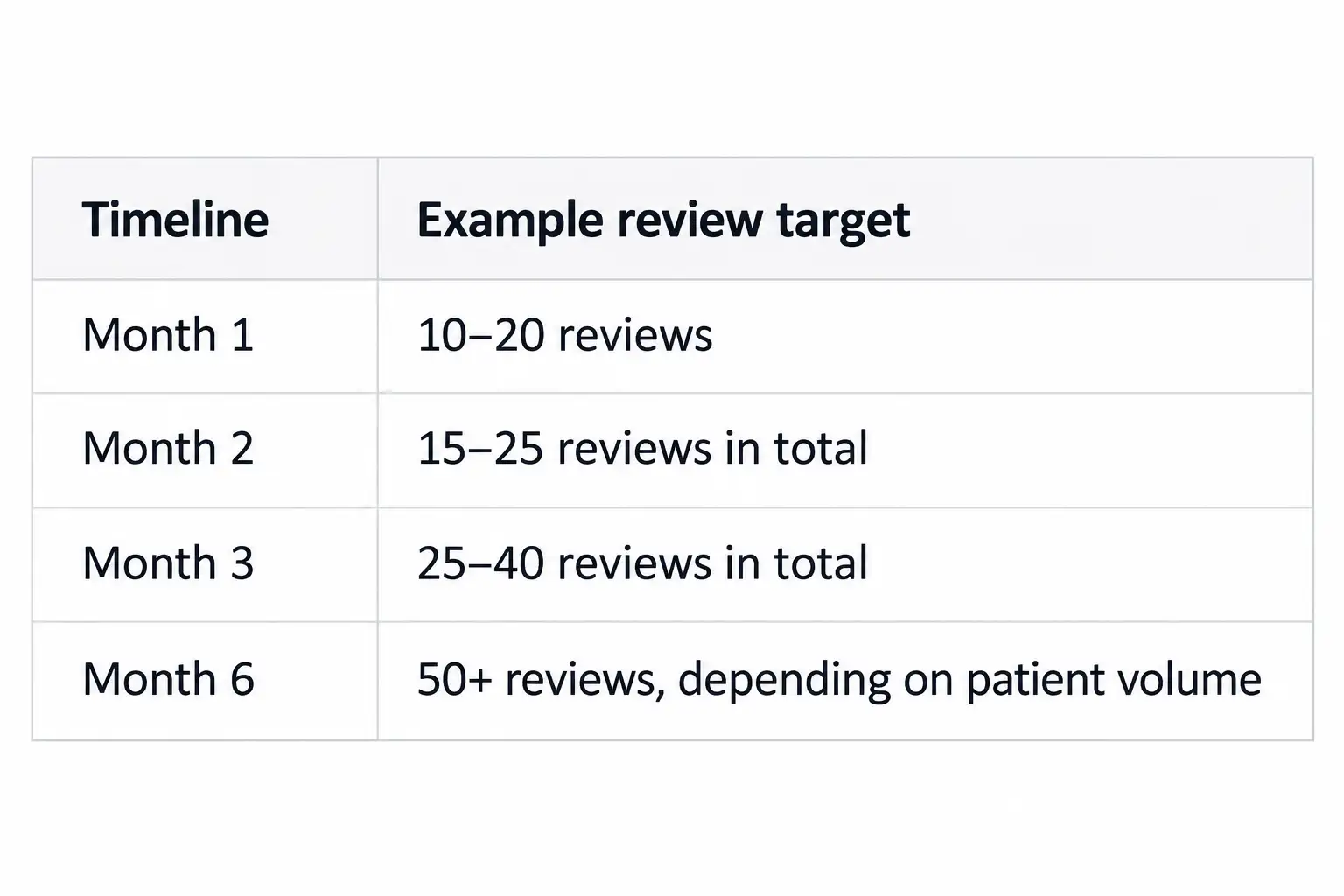
These figures are illustrative, not industry benchmarks. Your location may collect reviews faster or slower depending on patient volume and how well your review process is working.
Check your progress each month. If review numbers are falling behind, look at how often your team sends requests, whether patients receive the correct review link, and whether follow-ups are being missed. The aim isn’t to chase a particular number at any cost. It’s to make asking for honest feedback a consistent part of running your new practice.
Even if your dental group is sitting on a mountain of reviews, a new location can still be the new kid on the block. Your established offices may have years of patient feedback behind them, but the newest branch needs to earn its own local reputation. Keeping an eye on group-wide numbers alone can leave gaps in one location hidden behind the success of another.
Keep an eye on these details for every location:
You can track these details in a simple spreadsheet or dashboard, with a separate record for each office. Review the numbers monthly to spot gaps early, understand what patients are saying, and help every location build a stronger reputation in its local community.

.svg)

Harsh Bansal has spent 15 years pioneering, scaling, and redefining what dental marketing and data can truly unlock. He is at the forefront of AI-driven dental growth, helping more than 8,000+ dental practices and DSOs worldwide attract more patients, strengthen their market presence, and gain the financial clarity needed to drive sustainable growth.
Our healthcare marketing expert will get in touch with you

.gif)